
Announcements
19 .01 .2025
"The course registration for the Fall Semester of 2024-2025 will begin on Friday, September 20, 2024. Students will complete their course registrations by logging into the university's student information system (https://obs.firat.edu.tr/) using their student number and password.
After logging into the student information system, click on the “Course and Semester Transactions” section from the menu on the left, then select "Course Registration."
In the window that opens, select the tab corresponding to the student's current class (1st Class Courses, 2nd Class Courses, 3rd Class Courses, and 4th Class Courses) to view and select all the courses.
You need to select all courses offered in your current semester (click here to review the semester course list for the PDR department).
Once all necessary courses are selected, click the “Finalize” button on the course registration screen. You can make changes to your course registration until it is approved by your advisor, even if you have already finalized it. Remember to click the “Finalize” button again after making any changes.
During the approval phase of course registrations, advisors may make changes. Therefore, check the approved status of your course registrations with your advisor.
Click the "Curriculum/Extracurricular Courses" tab on the right side of the "4th Class" tab.
In the opened window, "Faculty of Education" should be selected as the unit, and "Guidance and Psychological Counseling" should be selected as the program.
Click the “List All Courses” button at the bottom right of the course list.
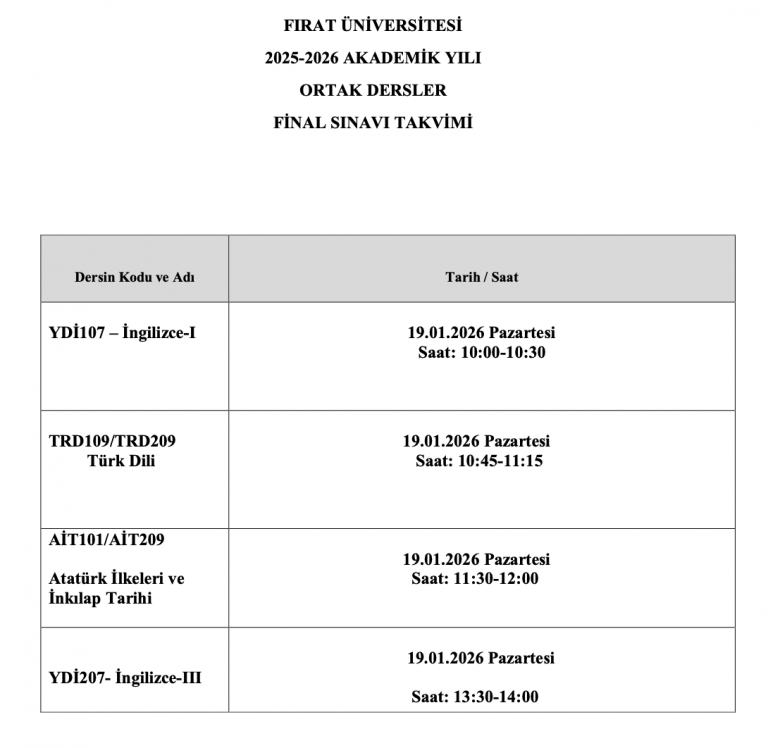
From the displayed groups, select one group for "AİT102 Principles of Atatürk and the History of Revolution 2" and one group for "YDİ108 English 2."
The days and times for the groups are written at the beginning of their respective lines.
The group should be selected that does not conflict with other scheduled classes according to the department's weekly class schedule (selected at different days and times).
Starting from the 2nd class in the fall semester, one Professional Knowledge elective (EGTS), one General Culture elective (GKS), and one Field Knowledge elective (PDRS) course must be selected upon course registration (students who have successfully completed 4 General Culture elective courses will not select a General Culture elective course). The Field Knowledge elective (PDRS) course is included among the regular semester courses.
To select Professional Knowledge (EGTS) and General Culture (GKS) elective courses:
In the course registration screen, click on the "Curriculum/Extracurricular Courses" tab on the right side of the "4th Class Courses" tab.
In the opened window, select "Faculty of Education" for the unit and "YÖK Common Courses" for the program. Click the “List All Courses” button located at the bottom right of the course list.
Select one course coded "EGTS" and one coded "GKS" from the displayed courses. (You should not select the course "EGTS14 Character and Value Education" among the elective EGTS courses.)
The quotas for these courses are limited. If the quota for the course you wish to select is full, you will need to choose another course from the same group.
Note: Courses taken from previous semesters will be recorded in the semester when they were first attempted. (For example, if course X is selected and failed in the fall semester, the course will be taken again in the next fall semester. It cannot be taken during the spring semester. Courses selected contrary to this rule will be deleted by advisors during the course registration approval process.)"
Other Announcements